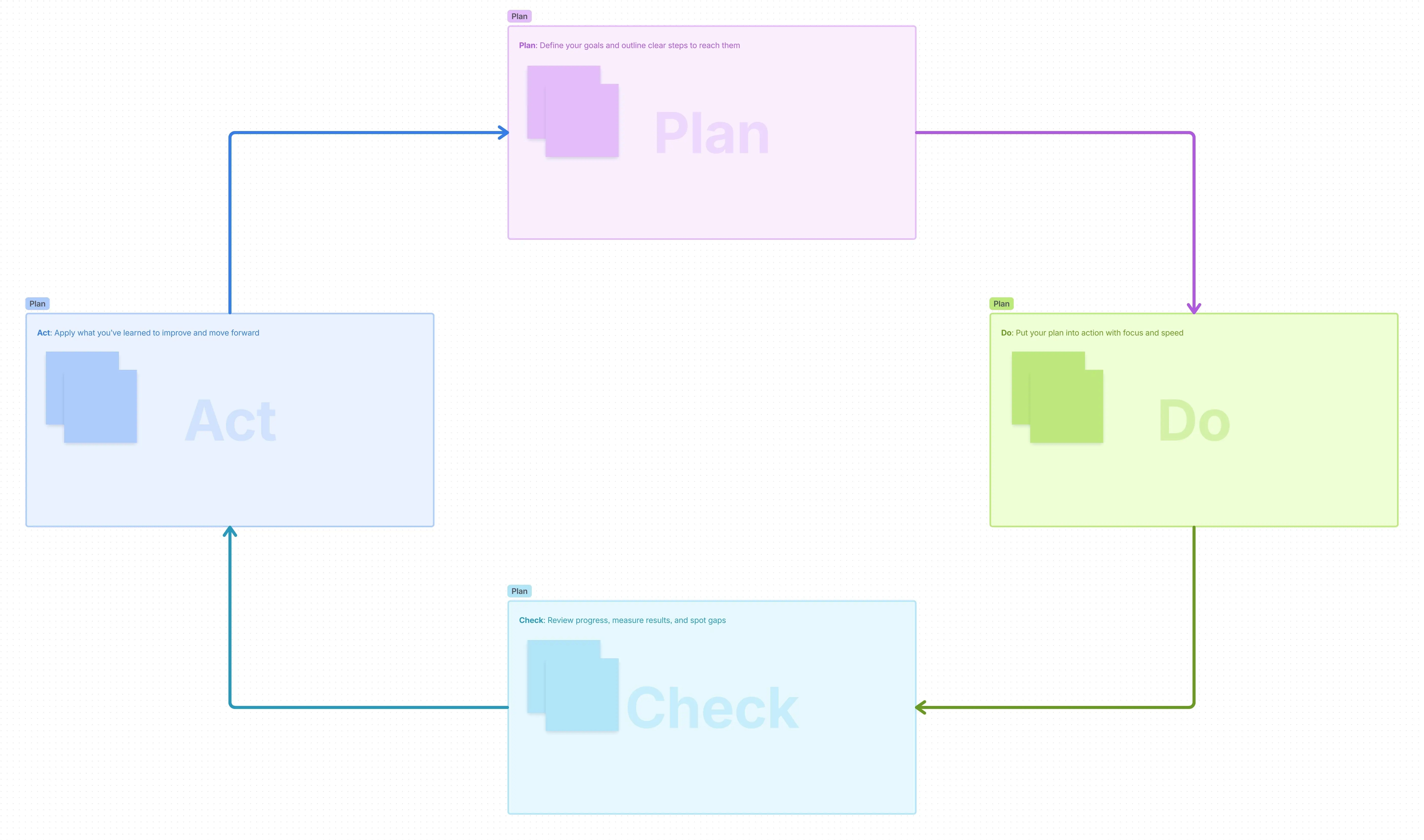
Plan-do-check-act template
Created by:

Implement improvement cycles that help teams solve problems and optimize processes
Categories
- Project Management
- Frameworks
- Whiteboard Template
KEY FEATURES
Progress Tracking
Feedback
Task Planning
The plan-do-check-act template provides teams with a clear roadmap for tackling challenges and driving meaningful improvements. This proven methodology breaks down complex problem-solving into manageable steps, making it easier for organizations to implement changes while minimizing risks. Learn more about the PDCA cycle, when you should use it, and best practices for implementing it into your workflow.
What is the plan-do-check-act (PDCA) cycle?
The PDCA cycle is used for the control and improvement of processes and products. Originally developed by Walter Shewhart and later refined by W. Edwards Deming, this methodology has become an essential part of quality management and continuous improvement practices worldwide.
Organizations across industries use PDCA because it provides a logical sequence for testing changes before full implementation. The cyclical nature of PDCA means that improvement is an ongoing process rather than a one-time event.
What is a plan-do-check-act template?
A PDCA template organizes each phase of the improvement cycle into clear sections with specific prompts and fields. The template includes spaces for problem identification, solution planning, implementation tracking, results analysis, and action steps.
The template simplifies implementing the PDCA methodology by providing a consistent format that teams can use repeatedly.
Why should you use a PDCA template?
Using a free plan-do-check-act template creates consistency across your improvement efforts, making it easier to compare and learn from past experiences. Teams save time because they don’t have to design their improvement process from scratch for each new challenge they face.
The template also improves accountability by clearly defining what needs to happen in each phase and who is responsible for specific tasks. This clarity reduces confusion and helps team members understand their roles in the improvement process.
When to use a PDCA Template
PDCA templates are most effective when addressing recurring problems, introducing new processes, or streamlining existing workflows. They’re especially valuable during project planning when you need to test assumptions before committing significant resources.
A PDCA template is also helpful when training team members on improvement methodologies or when you need to document your improvement efforts for compliance or knowledge-sharing purposes. Any situation that requires methodical problem-solving can benefit from this approach.
Can you use a PDCA template in any industry?
The PDCA template adapts well to virtually any industry because the fundamental logic of plan-do-check-act applies universally. Manufacturing companies use it for quality control, healthcare organizations can apply it to patient safety initiatives, and software teams might use it for process improvements.
In project management, teams often use PDCA templates to refine their iterative processes and improve project collaboration. The template supports effective strategic planning by providing a systematic approach that accommodates different industries’ specific requirements while maintaining the core improvement logic that makes PDCA effective.
How often should you update a PDCA template?
You should update your PDCA template after completing each improvement cycle or whenever you encounter significant changes in your processes or environment. Regular updates ensure the template remains relevant and continues to add value.
The frequency of updates often depends on how quickly your industry or organization changes. Fast-moving sectors might require monthly template reviews, while more stable environments only need quarterly updates. Ultimately, you want to maintain a template that reflects current realities and supports effective decision-making.
The benefits of using the plan-do-check-act method
Streamlines problem-solving
The PDCA method provides a structured approach to tackling complex issues by breaking them into manageable phases. For example, if a software development team sees a drop in user engagement, PDCA prevents reactive feature dumps. Instead, it encourages the team to analyze user behavior, plan targeted improvements, test changes with a small group, and evaluate results before implementing broader updates.
Enhances accountability
Each phase of the PDCA cycle involves specific inputs and outputs, making it easier to define roles and responsibilities. This structure promotes clearer ownership of tasks, strengthens accountability, and boosts collaboration across teams.
Improves efficiency
By emphasizing thoughtful planning before taking action, the PDCA method helps teams avoid wasted effort and unnecessary rework. Anticipating challenges early leads to faster, smoother execution.
Facilitates data-driven decisions
Rather than relying on guesswork, PDCA encourages teams to track and measure results at every step. This focus on outcomes leads to smarter decisions and minimizes the risk of implementing ineffective changes.
Promotes continuous improvement
As a cyclical framework, PDCA turns improvement into an ongoing process. Each completed cycle reveals new insights that can be applied to the next, enabling teams to evolve and refine over time—critical for long-term success.
How to use the plan-do-check-act template
- 1
Identify the problem or goal
Define the issue you want to address or the improvement opportunity you want to pursue. Collect data to understand the current issue and establish measurable criteria for success. This foundation work helps you set goals that are specific and achievable.
- 2
Plan the solution
Set clear objectives and outline the specific actions needed to achieve them. Assign each team member their responsibilities, establish timelines, and identify the resources required.
- 3
Implement the plan (Do)
Execute your planned actions, preferably on a small scale first. Document your observations during implementation because these notes will be valuable during the analysis phase.
- 4
Check results and analyze
Compare your actual results to the expected outcomes you projected during planning. Use data to identify gaps between expectations and reality and look for patterns that might explain any differences.
- 5
Act on findings
If your solution was successful, work to standardize the changes across your processes. If results fell short of expectations, take corrective actions to address the shortcomings.
- 6
Repeat the cycle
Restart the PDCA cycle using lessons learned from your previous iteration. This iterative process ensures that improvement becomes a regular part of how your team operates.
Use the PDCA template in Confluence
Confluence makes it easy to use PDCA templates by giving your team a central place to document each phase of your improvement cycle. You can setup dedicated project pages where everyone can access the current plan, track what’s being tested, and review results together. This keeps all your PDCA work organized and visible to stakeholders who need to stay in the loop.
Our online whiteboards take your PDCA process even further by letting teams visualize problems, find solutions, and map connections between different ideas. Whether you’re brainstorming root causes or analyzing check phase data, your whole team gets a shared space to contribute ideas.
Explore more templates to supercharge teamwork
Empower everyone, on every team. Build, connect, and deliver your biggest ideas seamlessly across Atlassian apps using our complete collection of ready-made workflows.