Transform teamwork with Confluence. See why Confluence is the content collaboration hub for all teams.Get it free
How to create effective project timelines and hit deadlines

Key Takeaways
A project timeline is a visual representation of a schedule that maps out every task, milestone, and deadline in chronological order from start to finish.
This roadmap helps teams manage expectations and identify potential scheduling conflicts before they impact the delivery date.
Utilizing a clear visual schedule ensures that all stakeholders remain aligned on the project's progress and upcoming requirements.
Create a comprehensive list of all project tasks and their dependencies to build an accurate schedule that reflects realistic work durations.
Most schedule slips come from inaccurate forecasting and weak project management, not lack of effort. There are plenty of outdated stats that show most projects don’t meet their original deadlines.
But it's not necessarily about project failure rate or incompetence. It's poor planning. Most project managers know how easy it is to set unrealistic time estimates, make changes to the project scope, and encounter communication issues.
Teams often underestimate complexity, face shifting priorities, and encounter delays from dependencies or unclear goals. A project management timeline keeps your team organized and prevents your initial plan from dragging on forever.
It’s like a detailed schedule for your project laying out all the tasks and their deadlines. In this article, we’ll answer what a project management timeline is, the difference between a project schedule, and how how to create one.
What is a project timeline?
A project timeline is a schedule for your complete project from inception to completion. It includes the project's tasks, milestones, dependencies, and start and end dates, which define the structure and schedule of the project.
The timeline also breaks your entire project into milestones, with a deadline assigned to each. This provides teams a visual time frame of when individual pieces are due and when the entire project is planned to be delivered.

What is the difference between a project schedule and timeline?
A project schedule is like a detailed to-do list for your project. It outlines all the tasks, their due dates, and who’s responsible for completing them.
Think of it as breaking down your project into smaller steps and planning exactly when each will happen.
On the other hand, a project timeline is more like a big-picture overview of your project, showing important benchmarks in a visual format. A timeline view visually represents the project’s key milestones and deadlines, so it’s easier to track progress and spot potential delays.
While a project schedule focuses on the specifics of what and when, a project timeline gives you a broader view of the overall progress. Both are essential tools to keep your project on track, but they do serve slightly different purposes to help you manage and communicate your progress.
It’s easier for teams to switch between detailed schedules and high-level views with customizable project timeline software to strengthen overall planning, tracking, and collaboration.
What are the benefits of project timelines?
A project without a timeline isn’t a project—it’s wishful thinking in spreadsheet form. The benefits of project timelines will keep projects organized, on schedule, and aligned with goals.
1. Keeps chaos in check
Without a timeline, projects drift. A timeline is the backbone that prevents “we’ll get to it eventually” from becoming your team’s motto.
It forces reality checks by exposing over-optimistic planning and makes you face whether your deadlines are actually doable — no more wishful thinking from leadership, stakeholder teams, or even yourself.
2. Drives accountability
When every task has a date and an owner, excuses evaporate. Everyone knows what’s expected and when.
Assigning deadlines to individual tasks creates accountability among team members. Everyone knows their responsibilities and the expected timelines for task completion,.
This will certainly help reduce procrastination and likely increase productivity.
3. Highlights bottlenecks early
You can’t fix what you can’t see. A good timeline surfaces delays before they snowball.
Project timelines allow project managers to identify potential risks and bottlenecks early in the project life cycle. By having a clear overview of task dependencies and critical path activities, project managers can proactively address issues and mitigate risks before they escalate.
4. Improves communication
Instead of endless “what’s the status?” meetings, a timeline gives instant visibility into progress.
With a clear timeline, team members have a shared understanding of project milestones, deadlines, and dependencies. Including assigned team members in the timeline clarifies responsibilities and ensures smooth collaboration throughout the project life cycle.
5. Aligns everyone
Project timelines act as the single source of truth, keeping leadership and cross-functional stakeholders marching in the same direction. In fact, an Axios report found only 9% of employees feel fully aligned with company goals.
You need to build trust and hitting milestones consistently shows stakeholders you’ve got your act together—no surprises or drama.
How to create a project timeline
One you have your project timeline, the right tools will help you organize, manage, and share your progress. Keeping everyone on track empowers your team to deliver its best work, so follow these steps to create your own detailed project timeline:
Step 1: Create an 'epic' project

Once you’ve defined the scope of your project, it’s time to set it up. You'll want to start by creating an epic, which is a large body of work or a significant feature that's too big to complete in one sprint.
Epics are broken down into multiple tasks, which can even be broken down further into smaller sub-tasks.
Step 2: Set up project tasks
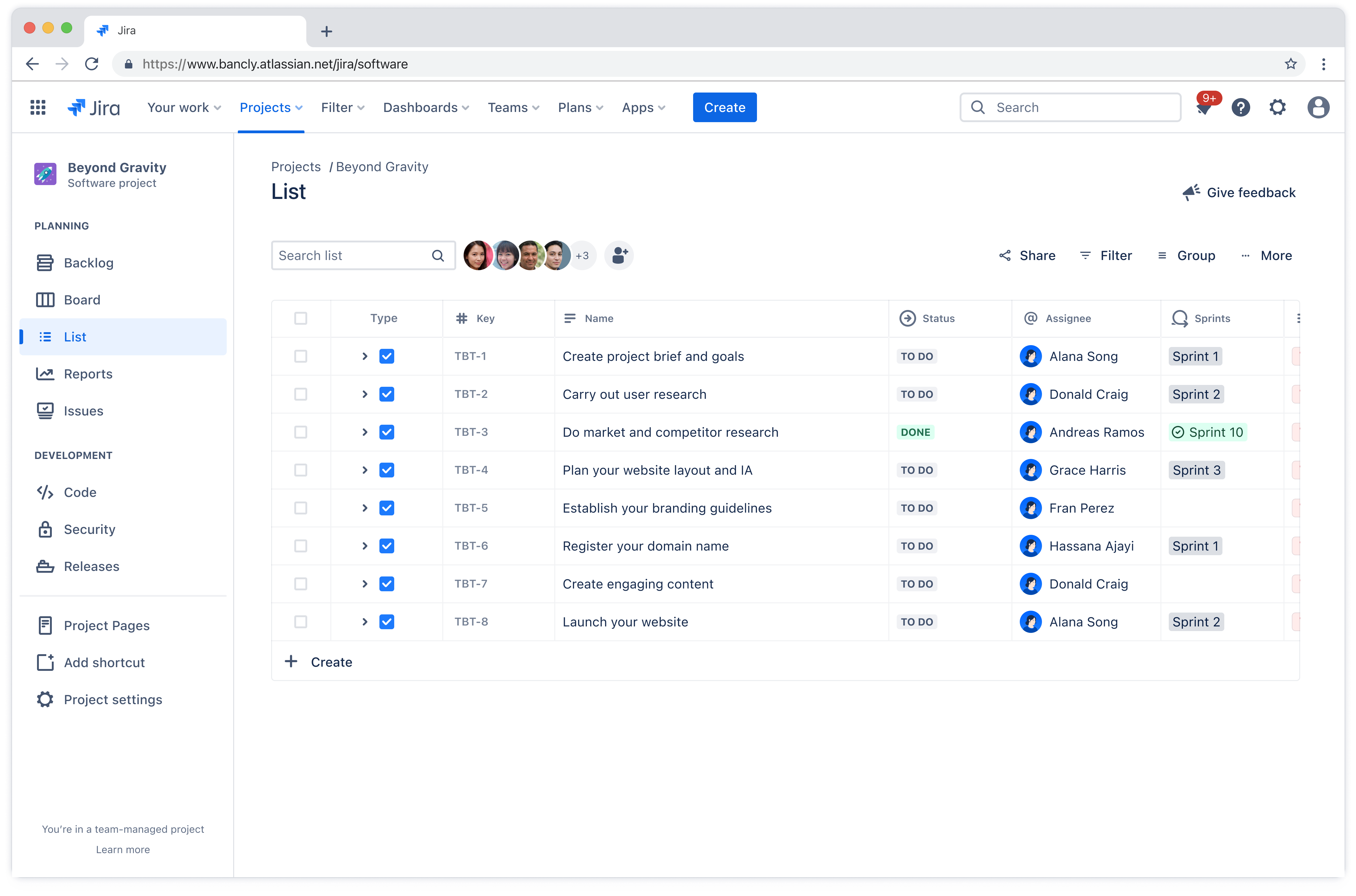
As you add your tasks, fill in details like summary, description, assignee, priority, and due dates. Use labels or components to categorize tasks. Rovo in Jira lets you use AI to handle these details.
Step 3: Use the timeline view and set dependencies

Schedule work and tasks by dragging their bars on the timeline view, and link tasks to epics and adjust their timing as needed. Link tasks that are dependent on other tasks happening first, so everyone is aligned on priority.
Step 4: Assign tasks

Assign team members to each task. Balance workloads effectively to avoid overloading resources or scheduling conflicts.
You can even use automations to assign tasks or breakdown them down based on effort or complexity with the help of AI. This helps with more effective resource allocation for your team.
Step 5: Share the Timeline

Export the roadmap or share a link with stakeholders. Use comments and @mentions to communicate updates or ask questions.
Step 6: Monitor Progress and Adjust as Needed

Continuously monitor the project’s progress against the timeline and update it as needed. Track actual versus planned progress, identify deviations or delays, and take corrective actions to keep the project on track.
3 project timeline templates to help you fast-track your process
Choosing the right project timeline software is crucial for effectively managing projects and ensuring successful outcomes. Use these templates to quickly help visualize schedules and get started:
1. Jira Project timeline template

The Jira project timeline template is a powerful tool for teams looking to plan, track, and manage projects with clarity and efficiency. This template provides a visual timeline to map out tasks, set deadlines, and monitor progress at a glance.
The quick-view and built-in features give you the option to consolidate important project details such as dependencies, resources and risks. You can also assign responsibilities and track milestones to keep your team agile and aligned.
With real-time updates, seamless communication functions, and the ability to manage simple or complex projects, this template helps ensure nothing falls through the cracks.
2. The Jira Scrum template

The Jira Scrum template is pre-formatted to help your team organize and plan work within the Scrum framework. This allows the product to be built in a series of fixed-length iterations (sprints) that give teams a framework for shipping on a regular cadence.
It’s designed to help agile teams organize their work, prioritize tasks, and deliver value efficiently. With this template, teams create and manage sprints, track progress on a visual board, and adapt quickly to changing requirements.
With built-in tools for backlog management and sprint planning, breaking down complex projects into manageable tasks is truly simple. The template also fosters collaboration, ensuring everyone stays aligned and focused on shared goals.
3. Jira Kanban board template

If you’re looking for a beginner-friendly option for managing tasks and schedules, look no further than the Jira Kanban board template. A Kanban board consists of various columns that represent different stages of a workflow.
This includes stages such as “To Do,” “In Progress,” and “Done,” and contains individual tasks or work items. Additionally, it’s one of the most popular frameworks to get teams into the agile methodology.
The Jira Kanban board template is ideal to help your team visualize their work, limit work-in-progress, and identify bottlenecks quickly. By making every task visible and easy to track, the Kanban board supports better collaboration and continuous improvement.
Start building your next project timeline with Jira
Unexpected challenges arise in projects, making it impossible to plan every outcome. Still, a project timeline offers valuable guidance and structure.
It is flexible to allow adjustments while providing a solid foundation that reduces confusion and maintains accountability.
Want to keep the team moving forward with your project timeline?
Try Jira today! This powerful tool offers a complete solution for getting work done. See why so many project managers trust Jira for all their project timeline needs.
Recommended for you
TEMPLATE
Project Poster Template
A collaborative one-pager that keeps your project team and stakeholders aligned.
Confluence Templates
Browse our library of Confluence templates to help your team create, organize, and discuss work.