Transform teamwork with Confluence. See why Confluence is the content collaboration hub for all teams.Get it free
What is capacity planning? A project management guide

Key Takeaways
Capacity modeling is a strategic process used to determine the production or service limits of an organization based on available human and technical resources.
This technique helps managers balance workloads and predict when additional hiring or infrastructure investment is required to meet future demand.
Accurate modeling prevents team burnout and ensures that project commitments are grounded in realistic operational capabilities.
Analyze your team's historical performance data to create a baseline for future resource allocation and project scheduling.
Whenever a new request arrives, or you're asked to support a cross-functional initiative, do you ask yourself questions like, "Does my team have the time to accomplish this, or will agreeing to the project spread everyone too thin?"
This is where good goal-setting skills come into practice. In fact, Atlassian data shows when teams are aligned on the actual end goal of a project, they're 4.9 times more likely to hit key deadlines.
However, setting realistic goals starts with effective capacity planning. When you skip this part of project planning, you don’t escape constraints—you collide with them at full speed.
Overcommitment becomes the default, teams get overloaded, deadlines slip, quality erodes, and urgent work constantly gets shoved aside. In that world, priorities are meaningless and trust decays quickly.
Capacity planning is the difference between successful project management and just hoping it all somehow works out. Keep reading to learn what capacity planning is, examples, and best practices, to help you manage your team more efficiently.
What is capacity planning?
Capacity planning is the process of determining the resource needs of your project by analyzing workloads, team availability, and individual skillsets to complete projects on time.
This process provides an honest and detailed approach to what your team can actually deliver compared to planning around what you hope will happen. You match demand (number of projects and requests) with supply (time, skills, and energy actually available), so you hit deadlines and avoid burnout.
Breaking down each word also helps paint a clearer picture of the purpose of capacity planning:
Capacity: Your team’s max limit where one more ask or quick favor becomes project overload. Understanding realistic capacity starts with understanding how much the team is already carrying.
Planning: How you—as a team lead—react once you know the limit. You prioritize, sequence, and schedule work to get the most important things done on time, while lower-priority work is pushed or explicitly declined.

Capacity planning vs. capacity management
Capacity management fits under the broader umbrella and a business's overall ability to oversee and coordinate all of its available resources to meet project and service requirements. While the term is more aligned to IT teams, it is increasingly being used for other load-planning departments.
Under that umbrella, capacity planning is one specific part of the process. This is a more laser-focused approach to mapping upcoming work to available people and time—the same way interviews are one step in the overall hiring process.
Capacity planning vs. resource planning
Resource planning looks at how you allocate specific resources—people, budget, software, equipment, and materials—to make the best use of each. This process maximizes the impact of the tools and assets already available.
That might mean tweaking a data dashboard to pull numbers more efficiently or pausing other reports so another can run first.
Capacity planning focuses on your people. It's about having individuals on the team with the right skills and available hours to meet a project’s requirements.
The advantages of capacity planning
Getting into the habit of properly planning toward your overall capacity can take some practice. However, there are numerous benefits to get into this habit right away:
1. Avoid team burnout
Burnout is real and it has been for awhile. A 2025 Robert Half survey found 36% of employees feel burned out, while 33% believe it's worse now than a year ago.
Unfortunately, this makes sense—if there’s no visibility into how much a team can accomplish, they’re bound to end up overextended. After all, there’s always more work to be done.
Taking steps to get a thorough understanding of your team’s actual capacity means you won’t overwhelm them with too many tasks and responsibilities. Support your team by helping them manage their time and prioritize their most impactful work.

There are helpful ways to individually document or track capacity as a team. Use the Confluence capacity planning template to detail each team member's project—with time estimates vs. expected available hours.
Teams can also track each project on their own to see what has the potential to max out or surpass their overall capacity. Starting with a simple template will help clarify availability right away.
2. Set more realistic deadlines
You’re already familiar with the fact that projects tend to run way over schedule. But most of us often tend to be eternal optimists who grossly underestimate how long projects will really take.
That bias is tough to combat, but capacity planning helps. When you get details about availability straight from your team, you'll have a much-needed reality check to better manage deadline expectations.
Typically, your team knows best on what they can actually produce. Don't be afraid to ask them to improve your initial planning.

If you're still unsure about capacity, there are powerful capacity planning tools like Jira that five you a clear timeline view of everyone's work. This helps you set realistic deadlines with a transparent view into everyone's capacity and assigned work.
3. Identify skills shortages
Capacity planning is about understanding what work your team can accomplish. That doesn’t just relate to time–it links to skills too.
By evaluating your team’s capacity and planning work in advance, it’s easier to spot if projects require skills that your team doesn’t have. Maybe that request from the sales team needs some big data chops you don’t possess in-house.
Accounting for that early allows you to take proactive action, such as training someone on your team, outsourcing a task, or changing the project scope to paint a more realistic timeline.
The most common challenges of capacity planning
Capacity planning offers numerous advantages, but it also requires some elbow grease. Let’s cover a few of the common hurdles you’ll need to jump over:
It’s tough to understand bandwidth
Think capacity planning is a one-time activity? Think again.
Your team’s bandwidth is always evolving as projects change and team members come and go. Plus, you need to rely on people’s honesty about their current workloads and limitations.
As we just mentioned, asking your team is a great initial start, but you have to understand that we all can over estimate our workloads. A team full of high-achievers are always likely to agree to more projects or requests.
This is why you need to consistently meet with your team to get a firm grasp on how much capacity is really available. During these sync calls, Jira Advanced Roadmaps help visualize and understand team members' workload and capacity.

Changes will throw you off track
You don’t have a crystal ball handy, and even the most experienced and well-intentioned project managers will hit some snags. Understand there are risks associated with every project.
From seasonality to industry changes, there's always the possibility of unforeseen challenges that will throw wrenches into your plans. Accounting for all of those potential setbacks, capacity planning isn’t always so straightforward.
Planning in a cushion (even if it’s just an extra day or two) will help you roll with the punches, without things running off the rails.
You’ll have to engage in some hard conversations
If your team has previously been the “yes” team within your company, committing to capacity planning is going to mean saying “no” too.
Remember, capacity planning is only useful if you do something with the information you identify. That can involve turning down projects due to lack of bandwidth, adjusting or reducing expectations, and pushing items with better deadline management guardrails.
It’s always better to say no than to say yes and not deliver.
Capacity planning best practices
A 2025 report from Runn found 9 in 10 leaders feel capacity planning is critical to organizational success, but only two-thirds perform regular capacity forecasting. To better plan for your team, follow these best practices:
1. Learn from past projects
Experience is a great teacher. When your team completes a project, host a postmortem to discuss how things went, paying close attention to any spots where capacity was stretched.
What led to that issue? Did the scope expand or did team members overestimate their availability? Pinpoint the root cause, and identify ways that you can avoid the same fate moving forward.
2. Have honest conversations with your team
Your team knows their bandwidth best, so have candid, recurring conversations about workloads and capacity. Remember that capacity is constantly evolving.
Dedicate a few minutes of your regular team meeting to discuss what’s currently on everybody’s plate.
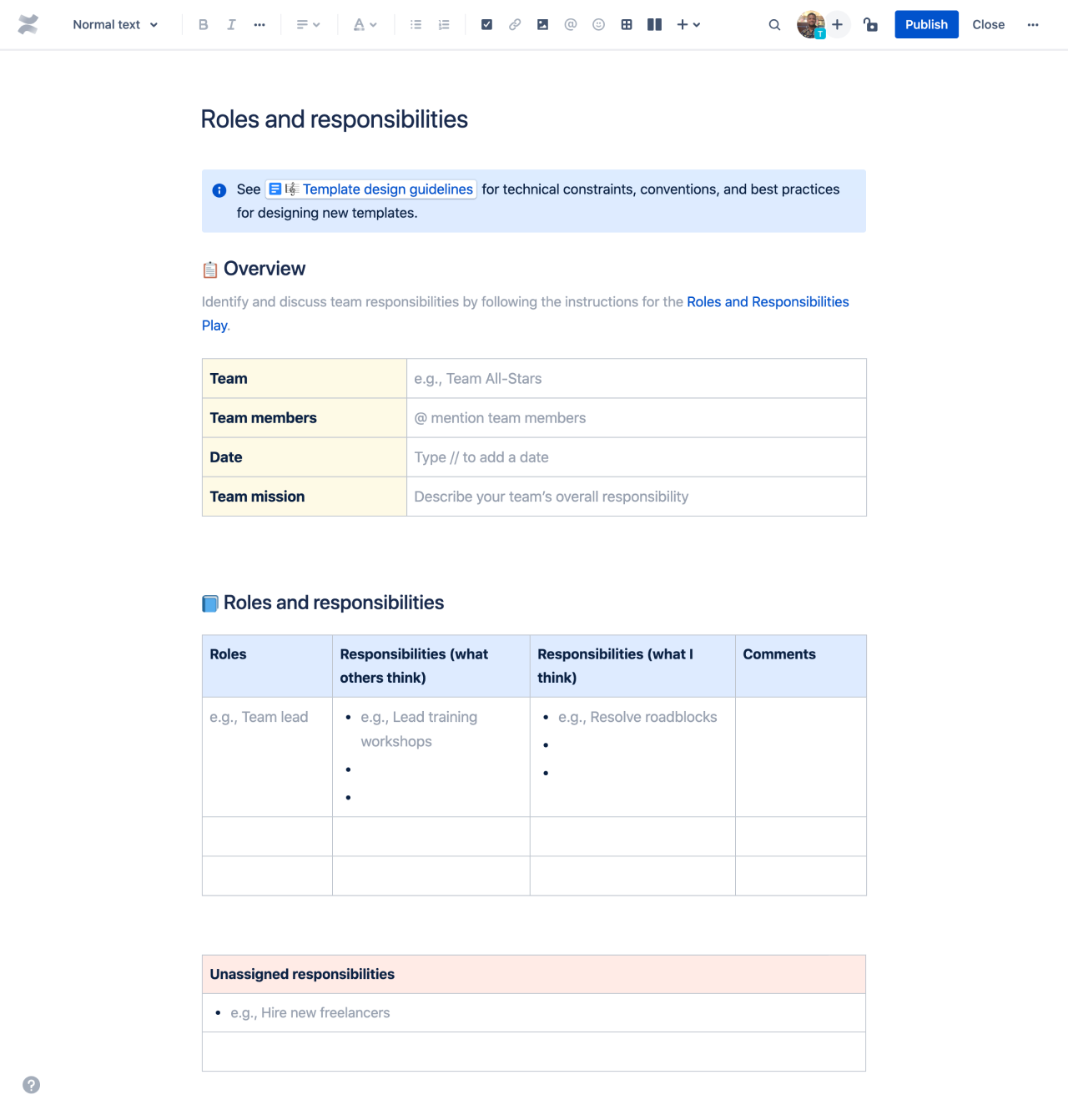
Documenting these discussions and use a Roles and responsibilities template to reference who's is in charge of what. This will also help track existing commitments and obligations for better planning.
3. Get the necessary details upfront
When a new project shows up, the worst move you can make is saying “yes” first and figuring out the plan later.
Flip that.
Start with capacity: get a brutally honest view of what your team can actually take on, then decide what fits and what doesn’t. When you stop guessing about bandwidth, you prioritize with a spine and set believable deadlines.
Instead of quietly signing your team up for chaos, protect their morale. No one said constantly maintaining and planning capacity was easy.
However, there are tools to that make this process even smoother. Start with Rovo in Jira to automatically review workloads and ensure work is evenly distributed.
More predictable delivery begins with better capacity planning
You don't need to predict the future with total accuracy. Instead, the best way to tackle capacity planning is creating a flexible, repeatable process that helps teams make informed decisions and adapt to change.
By regularly assessing workloads, understanding team capacity, and anticipating potential constraints, organizations avoid burnout, deliver projects more reliably, and respond quickly when priorities shift.
Capacity planning tools like Jira provide real-time visibility and support long-term planning to make it easier to spot issues early and adjust course as needed. Empower your team to work at a sustainable pace and achieve better outcomes with transparent view into workloads.
Recommended for you
TEMPLATE
Roles and responsibilities template
Define responsibilities for team members and identify opportunities for team growth
TEMPLATE
Capacity planning template
Take the guess work out of your estimation and prioritization
Confluence Templates
Browse our library of Confluence templates to help your team create, organize, and discuss work.